

How to Patch the Critical PHP Bugs (PHP2Shell)
Two critical PHP bugs, CVE-2026-109618 and CVE-2026-109619, let attackers take over web servers. Here is how to check your version and fix it on Windows, Linux and WordPress.
On 21 October 2026, PHP released emergency fixes for two critical bugs that let attackers take over a web server without logging in. If your website runs on PHP — and that includes every WordPress, WooCommerce, Drupal, Joomla and Magento site — you need to update today.
The two bugs are known as CVE-2026-109618 and CVE-2026-109619, and security researchers have nicknamed them PHP2Shell. Both are rated 9.2 out of 10 (critical). Attacks began even before the fix was out, and Sansec expected mass attacks to start within 15 minutes of the release, because attackers can compare the old and new code to see what was fixed.
This guide explains, in plain English, who is affected and how to fix it step by step, with screens for each step.
Who is affected
Any server that uses PHP to serve web pages is at risk. That covers PHP-FPM, Apache with mod_php, php-cgi, FrankenPHP and LiteSpeed. The risk is highest on Apache with mod_php, where an attacker can trigger the bug before your website’s own code even runs.
- CVE-2026-109618: if PHP runs out of memory halfway through reading a request, it can treat half-finished data as if it were complete.
- CVE-2026-109619: leftover data from one visitor’s request can stay in memory and be reused by the next request.
Both can let an attacker run their own commands on your server.
Which version is safe
Update to at least the fixed version for your PHP branch:
| Your PHP branch | Safe version (or newer) | Notes |
|---|---|---|
| 8.5 | 8.5.12 | Recommended |
| 8.4 | 8.4.27 | Recommended |
| 8.3 | 8.3.36 | Supported |
| 8.2 | 8.2.35 | Support ends 31 December 2026 |
| 8.1, 8.0, 7.4 | No official release | Upgrade to 8.3 or newer, or ask your host for a backported patch |
| 7.3 and older | No fix | Upgrade now |
Where the fix comes from:
- Windows: PHP itself publishes ready-made fixed builds for Windows, so you can download and install them right away.
- Linux: PHP releases only the source code. You get the fixed version from your Linux distribution’s packages or from your hosting provider.
The volunteer-run Remi repository, which many CentOS, RHEL and AlmaLinux servers use, had no update on release day. If your server uses it, switch to your distribution’s own packages.
Step 1: Check your PHP version
On Windows, open Command Prompt. On Linux, connect to your server with SSH. Then type php -v and press Enter.
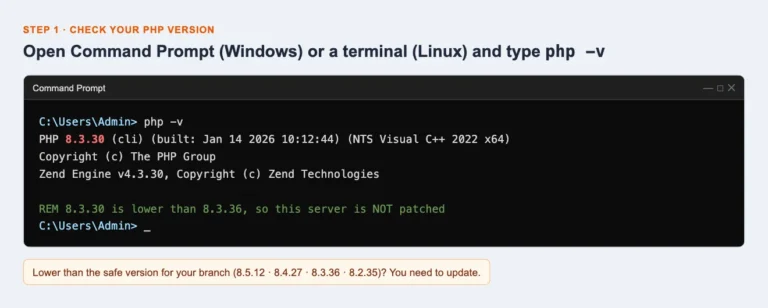
If yours is lower than the safe version for your branch, keep going. Other ways to check:
- WordPress: go to Tools › Site Health › Info › Server.
- cPanel: open MultiPHP Manager.
- Hostinger: go to hPanel › Advanced › PHP Configuration.
The command line and your website can use different PHP versions, so check both.
Step 2: Update PHP on a Windows server
PHP publishes official fixed builds for Windows, so you can update today. Plan for about 10 minutes of downtime.
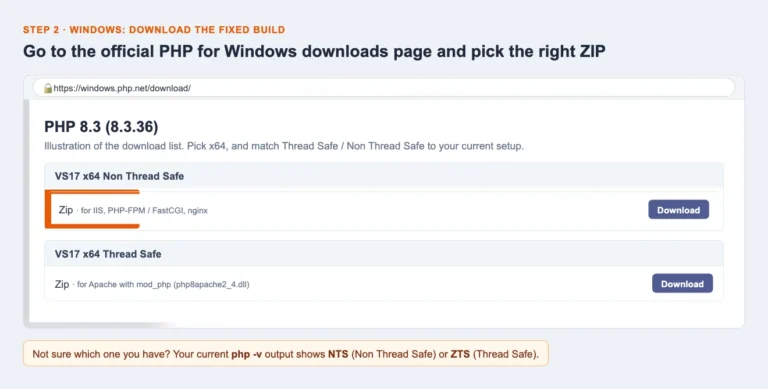
1. Download the fixed build. Go to the official PHP for Windows downloads page and open the section for your branch. Pick the x64 ZIP that matches your current setup:
- Non Thread Safe (NTS): for IIS or FastCGI.
- Thread Safe (TS): for Apache with mod_php.
2. Swap in the new folder.
- Stop your web server.
- Rename your current PHP folder, for example
C:\phptoC:\php-old-8.3.30, so you have a backup. - Unzip the new download into
C:\php. - Copy your php.ini from the old folder into the new one, plus any extra extension DLLs you added yourself.
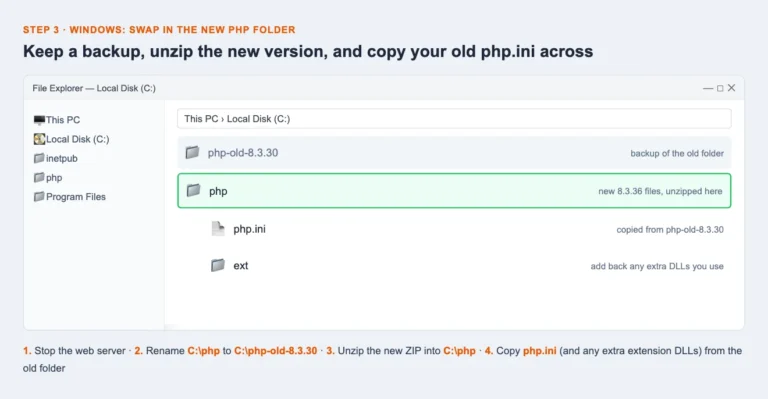
3. Restart and confirm. Open Command Prompt as Administrator. If you use IIS, run iisreset. If you use Apache, run httpd -k restart. Then run php -v again and check that it shows the fixed version.
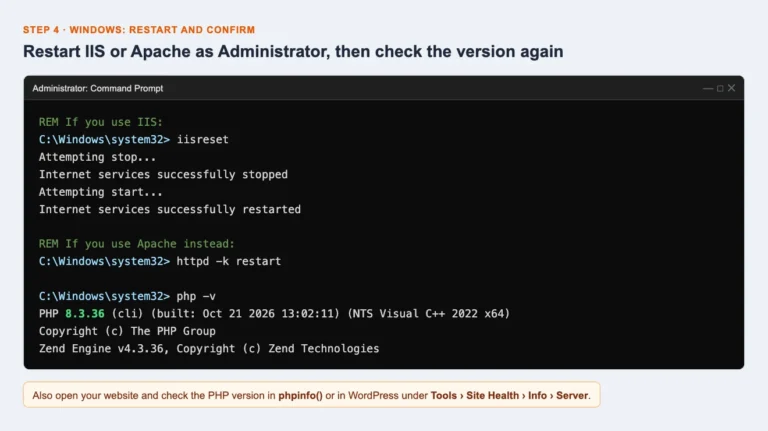
Using XAMPP, WampServer or Laragon? These bundles ship their own copy of PHP. Update the bundle, or swap its php folder the same way as above. Some Windows apps and appliances also include their own php.exe or php-cgi.exe, so ask those vendors for an update too.
Step 3: Update PHP on Linux, shared hosting and WordPress
Linux VPS or dedicated server. Update PHP through your distribution’s package manager, then restart PHP and the web server.
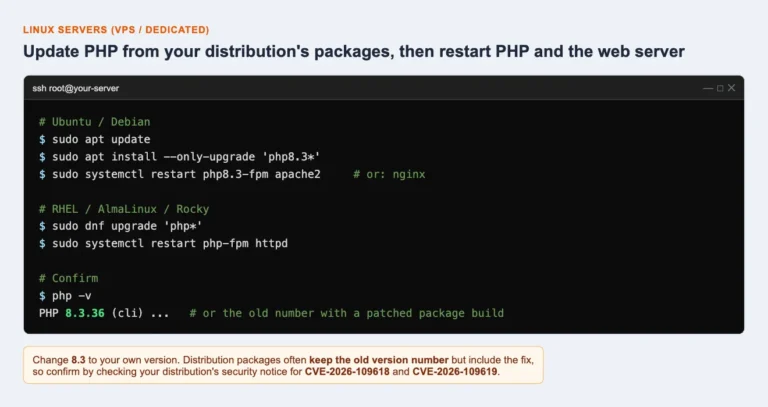
Distribution packages often keep the old version number but include the fix. To confirm, check your distribution’s security notice for CVE-2026-109618 and CVE-2026-109619.
Docker. Pull the latest official php image for your branch, rebuild your containers and redeploy.
Shared or managed hosting (Hostinger, SiteGround, Bluehost, GoDaddy and similar). Your host updates PHP for you, and you can’t do it yourself. Contact their support and ask:
“Has PHP on my account been patched for CVE-2026-109618 and CVE-2026-109619?”
If your site is on PHP 8.1 or older, switch it to 8.3 or newer in your hosting panel, then test the site.
WordPress. Updating WordPress, your theme or your plugins does not fix this, and neither do auto-updates. The fix has to happen on the server. Wordfence has warned site owners to confirm who is responsible for updating PHP.
Can’t update today? Lower the risk until you can
These settings reduce the risk, but they do not make your server safe. Updating PHP is the only real fix. Add them to php.ini or to your PHP-FPM pool settings, then restart every PHP process.
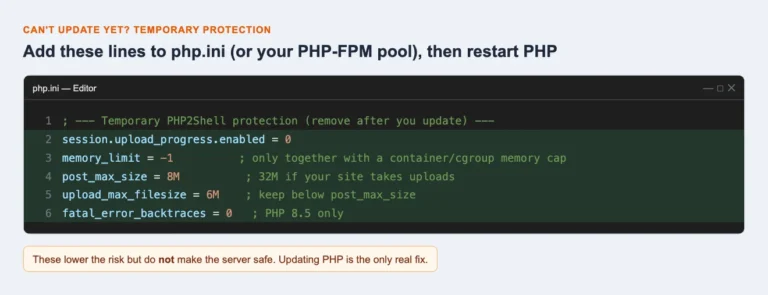
- session.upload_progress.enabled = 0: closes the upload-progress route that has already been used in attacks. Setting it with
ini_set()or.user.iniwon’t work. - memory_limit = -1: use this only if the server also has a container or cgroup memory cap. Without one, a single request can use up all the server’s memory.
- Smaller post_max_size: use 8M, or 32M if your site takes uploads. Keep upload_max_filesize below it.
- fatal_error_backtraces = 0: applies to PHP 8.5 only.
- Web application firewall (WAF): add rules if you have one. Cloudflare has deployed rules for all its customers, but calls them “a stopgap only”.
- Old PHP (8.1 or older) you can’t update: take the site offline, or put it behind a VPN, until you can upgrade. CERT-EU and several national agencies gave the same advice.
Step 4: After updating, check you weren’t hacked
Attacks started before the fix came out, so a patched server may already have been broken into. Check for these signs:
- New or changed PHP files in your website folder, especially in uploads folders
- New admin users in WordPress or your control panel
- New cron jobs (Linux) or scheduled tasks (Windows)
- PHP processes starting
cmd.exe,powershell.exe,bash,curlorwget - Unusual outbound connections from the web server
If you find anything, take the server offline, keep the logs, restore from a clean backup and change all your passwords.
Quick answers
Is my WordPress site affected? Yes, if its server runs an unpatched PHP version. The bug is in PHP itself, not in WordPress.
Will a WordPress update fix it? No. PHP has to be updated on the server.
I’m on PHP 8.1 or older. What now? Upgrade to PHP 8.3 or newer. PHP 8.2 is fixed too, but it stops getting security updates on 31 December 2026.
Why are fixed downloads only for Windows? PHP itself publishes ready-made builds only for Windows. Linux users get the fix through their distribution or hosting provider.
Not sure where your site stands? Send us a message through our contact page and we will check your PHP version and update it for you.
The screens in this guide are illustrations of each step. Your version numbers and folder names may be different.
Sources and further reading
- PHP security advisory, 21 October 2026 (php.net)
- PHP Panic: two critical bugs (Yahoo Tech)
- php2shell: leaked critical PHP vulnerabilities (Huntress)
- PHP2Shell: how to fix PHP RCE (Aikido)
- PHP for Windows downloads
Let our WordPress team handle it.
Related services: Maintenance & Security · WordPress Migration
Get a free quoteMore articles.
WordPress SEO Basics: 10 Things Every Website Should Have
You do not need to be an SEO expert to get the basics right. These ten essentials help Google find, understand and rank your WordPress site.
Read article →
The Gutenberg Block Editor: A Simple Guide for Business Owners
Gutenberg is the built-in WordPress editor. Learn how blocks work and how to update your pages with confidence — no developer needed.
Read article →
How to Make Your WordPress Website Mobile-Friendly
Most visitors now browse on their phones. Here is how to make sure your WordPress site looks great and works smoothly on every screen.
Read article →Ready for a website that works?
Tell us about your project. We'll reply within one business day with ideas, a timeline and a fixed quote.
project ↗
